Let’s be honest: getting your message in front of customers is harder than it used to be. Emails sit unopened, SMS gets ignored, and ads cost more every year. Meanwhile, your customers are already on WhatsApp, chatting with friends and family dozens of times a day.
That’s why more brands are turning to the WhatsApp Business API. And when you pair it with a solid bulk messaging feature like Antiqq’s, you can talk to thousands of customers at once without losing the personal touch. In this post, we’ll walk through what bulk messaging is, how it works on the WhatsApp API, and how Antiqq can help your campaigns perform better.
What Is Bulk Messaging on the WhatsApp Business API?
Bulk messaging means sending one message to a large group of people at the same time. Think of a festive sale announcement, a new product launch, or a “your order has shipped” update going out to thousands of customers in a few clicks.
Doing this by hand would take days. With the WhatsApp Business API, it takes minutes. Whether you run a small online store or a growing enterprise, it lets you reach a wide audience quickly while still keeping each message relevant.
How is the WhatsApp API different from the regular WhatsApp Business app?
The free WhatsApp Business app is great for small shops that chat with a handful of customers. But it has limits. You can’t automate much, you can’t connect it to your CRM, and broadcasting to large lists gets messy fast.
The WhatsApp API is built for scale. It supports multiple agents, automation, chatbots, approved message templates, and integrations with your existing tools. Antiqq gives you access to all of this through a simple dashboard, so you don’t need a technical team to get started.
Why Businesses Are Switching to WhatsApp API for Marketing
There’s a simple reason: people actually read WhatsApp messages. They’re personal, immediate, and happen inside an app people already open every day. Compared to a promotional email that lands in a crowded inbox, a WhatsApp message feels more like a note from someone you know.
A few other reasons businesses are making the move:
-
Customers are already there. You don’t have to convince anyone to download a new app.
-
Rich messages. You can send images, PDFs, videos, buttons, and links, not just plain text.
-
Two-way conversations. Customers can reply, ask questions, and buy, all in one thread.
-
Verified presence. The WhatsApp Business API lets you apply for an official business profile, which builds trust.
If you’re still depending only on email and SMS, you may be leaving real engagement on the table.
How Antiqq Helps Boost Your Marketing Campaigns
Here’s where Antiqq’s bulk messaging feature comes in. It’s designed to make big campaigns feel easy, and to make sure the people receiving them actually care.
1. Wider reach with minimal effort
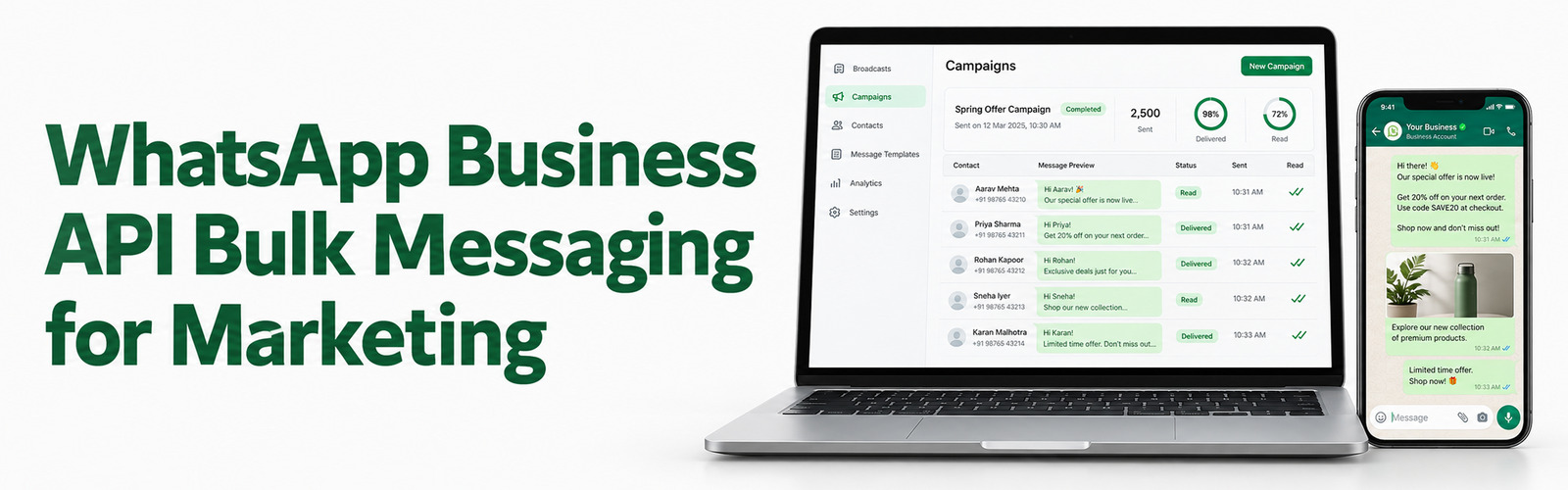
Picture sending a message to every customer one by one. Exhausting, right? With the Antiqq WhatsApp Business API, you upload your contact list, choose your template, and send to thousands of people in a few clicks.
Running a flash sale? Announcing a new service? Sharing an important company update? The process is the same: quick and painless. And because more people see your message, you get better engagement and stronger brand visibility without adding to your workload.
2. Personalized campaigns that feel human
Nobody likes a message that screams “mass blast.” Antiqq lets you segment your audience by preferences, behavior, or past interactions. You can create groups like loyal customers, new leads, or first-time buyers, and send each group something that actually fits them.
Add the customer’s name, mention their last purchase, or offer a deal based on what they’ve browsed. That small bit of personalization makes people far more likely to read, reply, and buy.
3. Save time and cut costs
Manual outreach eats up hours your team could spend on better things. Automating campaigns through the WhatsApp API frees up your staff and brings down your operational costs.
It’s also a smart channel for budgets. Compared with traditional marketing methods, WhatsApp messaging can be a cost-effective way to run large campaigns, especially when your messages are well targeted and not wasted on people who’ll never open them.
4. Track performance in real time
Sending the message is only half the job. You also need to know whether it worked. Antiqq’s dashboard shows delivery rates, read rates, and replies as they happen.
If a campaign isn’t landing, you’ll see it quickly and can tweak your timing, copy, or audience before wasting more budget. Over time, this data helps you build a clear picture of what your customers respond to.
Smart Ways to Use WhatsApp Bulk Messaging
Not sure where to begin? Here are some practical ideas that work well on the WhatsApp Business API:
-
Promotional offers: Share discounts, seasonal deals, and limited-time coupons.
-
New product launches: Send an image, a short description, and a “Shop now” button.
-
Order and delivery updates: Keep customers informed so they don’t need to message support.
-
Appointment reminders: Great for clinics, salons, coaching centers, and service businesses.
-
Abandoned cart nudges: A gentle reminder can bring back a sale you’d otherwise lose.
-
Feedback requests: Ask for a quick rating after a purchase.
-
Event invitations: Webinars, store openings, or product demos.
Mix these up so your messages feel useful and not just salesy. When customers get value from your updates, they’re far more likely to stay subscribed.
Best Practices for Bulk Messaging on WhatsApp API
Powerful tools come with responsibility. If you want long-term results from your WhatsApp API campaigns, keep these habits in mind.
Get permission first. WhatsApp requires customers to opt in before you message them. Collect consent through your website, checkout page, QR codes, or in-store forms. It keeps you compliant and keeps your audience genuinely interested.
Use approved templates. For business-initiated messages, WhatsApp needs message templates to be approved in advance. Write them clearly, avoid spammy language, and make sure the purpose is obvious.
Don’t over-message. Sending too often is the fastest way to get blocked. Pick a sensible rhythm, whether that’s weekly or only when you have something worth saying.
Timing matters. Messages sent late at night or at awkward hours tend to annoy people. Think about when your customers are most likely to be free and attentive.
Keep it short and clear. A WhatsApp message isn’t a newsletter. Get to the point, add one clear call-to-action, and make it easy to respond.
Make opting out easy. Let people unsubscribe without hassle. It protects your quality rating and your reputation.
Why Choose Antiqq WhatsApp Business API?
There are plenty of providers out there, so what makes Antiqq worth a look? Here’s the short version:
-
Simple setup. Get started without a complicated technical process.
-
Easy-to-use dashboard. Manage contacts, templates, and campaigns in one place.
-
Segmentation tools. Reach the right people with the right message.
-
Real-time analytics. See what’s working and fix what isn’t.
-
Scalable for any business. Whether you’re sending hundreds or hundreds of thousands of messages, the platform grows with you.
Adding Antiqq bulk messaging to your marketing strategy makes communication simpler, builds stronger customer relationships, and can help lift your conversion rates.
Conclusion
Marketing today is about showing up where your customers already spend their time, and for millions of people, that’s WhatsApp. The WhatsApp Business API gives you the tools to reach a large audience, personalize your message, automate the heavy lifting, and measure everything along the way.
Antiqq makes that process smooth, even if you’ve never used the WhatsApp API before. Start small, test a campaign, study the results, and build from there. Once you see how much easier and more effective bulk messaging can be, you probably won’t go back to the old way.
Ready to try it? Start using Antiqq today and give your marketing campaigns the boost they deserve.
Frequently Asked Questions (FAQs)
-
What is the WhatsApp Business API?
It’s a version of WhatsApp built for medium and large businesses. Unlike the standard WhatsApp Business app, it supports automation, multiple agents, chatbots, and bulk messaging, and it connects with your CRM and other tools. -
Can I send bulk messages to anyone using the WhatsApp API?
No. You can only message people who have opted in to hear from your business. Messages you start yourself must also use templates approved by WhatsApp. -
Is bulk messaging on WhatsApp better than SMS or email?
It depends on your audience, but WhatsApp often gets stronger engagement because people check it constantly and the messages feel more personal. It also supports images, videos, documents, and buttons, which SMS can’t match. -
Can I personalize bulk messages with Antiqq?
Yes. You can segment your audience by preferences, behavior, or past interactions, and tailor messages for each group, including adding details like the customer’s name. -
How do I know if my campaign is working?
Antiqq provides real-time tracking for delivery, read, and response rates, so you can see results quickly and adjust your approach. -
Do I need technical knowledge to use the WhatsApp Business API with Antiqq?
Not really. The dashboard is built to be user-friendly, so marketing and support teams can run campaigns without writing any code.
Related Blogs
WhatsApp Business API Message Templates: How Antiqq Simplifies Business Communication...Read more
How to Automate Customer Support with the Antiqq WhatsApp Chatbot...Read more
How Antiqq Bulk Messaging Can Boost Your WhatsApp Marketing Campaigns...Read more
How to Measure the Success of Your WhatsApp Marketing Campaigns...Read more
WhatsApp Shared Team Inbox: How to Manage Customer Conversations Efficiently...Read more
WhatsApp Lead Generation: How to Turn Conversations into Customers...Read more
WhatsApp Business API Pricing Explained: What Every Business Should Know...Read more
How to Choose the Right WhatsApp Business API Platform for Your Company...Read more
WhatsApp Business API vs WhatsApp Business App: Which Is Right for Your Business?...Read more
WhatsApp Message Templates Made Simple: How to Communicate Better with the Antiqq WhatsApp Business API...Read more
